問題原因:Flash Player的版本為10.1.53.64,點我檢查版本
問題特徵:進行螞蟻副本時,網頁的Flash Player會當掉,或是網頁停止運作等等情況,無法正常進行遊戲。解決方法:安裝10.0版的Flash Player,建議安裝Flash Player 10.0.45.2
- 解決步驟:
- 下載Flash Player移除程式,點我下載
- 關閉網頁瀏覽器、即時通之類會使用到Flash的程式
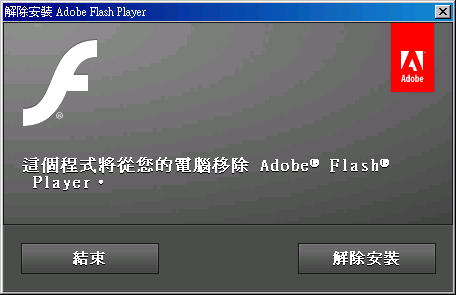
- 執行uninstall_flash_player.exe,並按下解除安裝
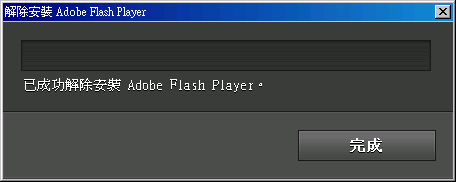
- 等待解決安裝完畢,按下完成
- 下載10.0版的Flash Player,點我下載Flash Player 10的存檔版本。如果嫌到檔案太大請自行去Google搜尋,或是點我下載IE版本的Flash Player 10.0.45.2[XUN6空間]。
- 解壓縮fp10_archive.zip
- 關閉網頁瀏覽器、即時通之類會使用到Flash的程式
- 進入fp10_archive資料夾內,開啟readme.txt看說明
- 找到第35列的Flash Player 10,0,45,2,根據您所使用的作業系統以及網頁瀏覽器來決定要執行哪個安裝程式
Windows 9x/ME/NT/2000/XP
- Internet Explorer: flashplayer10r45_2_winax.exe
- Netscape: flashplayer10r45_2_win.exe
- Standalone: flashplayer10r45_2_win_sa.exe
Mac OS X
- Plugin: flashplayer10r45_2_ub_mac.dmg
- Standalone: flashplayer10r45_2_mac_sa.app.zip
Linux
- Plugin: flashplayer_10r45_2_linux.tar.gz
- Standalone: flashplayer_10r45_2_linux_sa.tar.gz
Solaris
- x86: flashplayer_10r45_2_solaris_x86.tar.bz2
- Sparc: flashplayer_10r45_2_solaris_sparc.tar.bz2 - 以Windows來說,如果是用IE的就到10r45_2資料夾內,執行flashplayer10r45_2_winax.exe
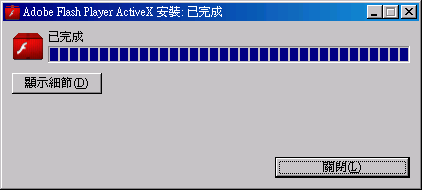
如果是用Firefox或是Google瀏覽器,就到10r45_2資料夾內,執行flashplayer10r45_2_win.exe - 執行安裝程式,會自動開始安裝,稍等一下,就會顯示已完成
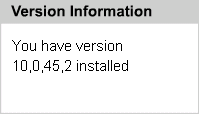
(圖為執行flashplayer10r45_2_winax.exe的結果) - 再去檢查版本,成功的話,會顯示「You have version 10,0,45,2 installed」
- 此時就可以去彈彈堂-聯合登入網頁,開始享受玩螞蟻副本的樂趣
註:如果您在步驟10安裝Flash Player的時候,出現「您正在嘗試安裝的 Adobe(R) Flash(R) Player 版本不是最新版。」,表示您在步驟2沒有成功完成解除安裝的動作。

資料來源:
Archived Flash Player versions
http://forum.gamer.com.tw/C.php?bsn=17178&snA=595&tnum=8
http://forum.gamer.com.tw/C.php?bsn=17178&snA=595&tnum=8
如果刪除Flish的選項時
請先把網頁都關掉!
如果還是出現捨 Windows
Mexxxxxxxx 而不能刪除的話
1.請在下方工具列點選右鍵
2.點選工作管理員
3.點選上面應用程式旁邊的"處理程序"
4.找出 msmsgs.exe 的影像名稱
5.點msmsgs.exe 右鍵
6.點結束處理程序
7.在點"是"
完成之後就可以順利刪除囉!!!!!

沒有留言:
張貼留言